DESKTOP APP · WINDOWS 10/11
PaintByNumbers Studio turns any photo into a printable numbered painting guide: clean vector outlines, A4 tiled at the size you want, and automatic colour match against real acrylic palettes (Maimeri Polycolor, Maimeri Brera, Acrilico 200ml, your personal palette...).
Try it free before you buy · One-time · No subscription · Works offline · 1 PC per licence
On a Mac? Go to the macOS version.
USE CASE
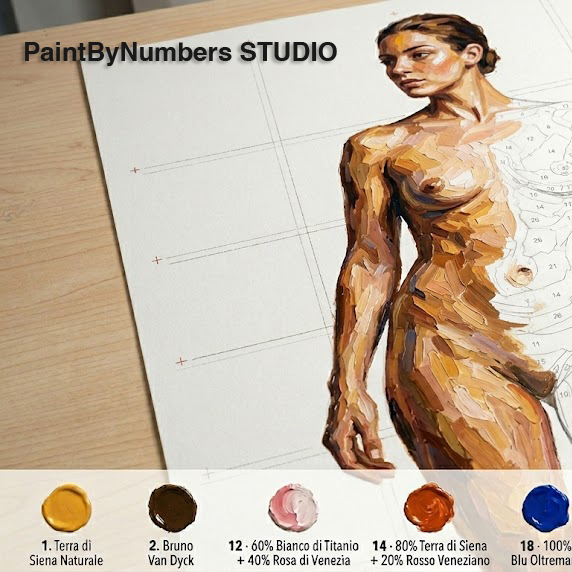
PBN Studio splits the drawing into A4 sheets with registration marks and overlap guides. Print, tape together, trace onto canvas. Works for a 30 cm sketch and for full 1:1 human figures alike.
WHO'S BEHIND IT
PaintByNumbers Studio started because I needed it. I paint acrylics on canvas in my spare time, and I built my own tools to go from photo to canvas without losing my mind. Once they actually worked, I made them available to anyone who shares the hobby.
Mysticman Productions it's simply the label under which I group my independent projects: I'm behind it, between programming and painting. It's not an "industrial" product; it's an independent project born from a personal passion and improved over time by those who actually use it. I still use it every time I want to transform a photo into a painting project.
Everything you need to go from photo to canvas. Nothing else.
01
Three modes (outline / edges / combined) with controls over threshold, blur, Canny and Potrace. Live preview as you tweak.
02
Set the subject height in cm (or inches), the app computes the A4 grid or the format you prefer. Registration marks and overlap guides built in.
03
K-means quantization in LAB space, matched against real tubes from Maimeri Polycolor (25), Maimeri Acrilico 200ml (98) or a generic palette with the colors you have available.
04
Build your own palette, sample colors directly from photos on your screen, save and reload across sessions.
05
Optional grid overlay (mm or inch) for classic cell-by-cell transfer onto canvas. Tone and colour adjustable.
06
Print-ready PDF with legend, region numbers and colour preview. Also SVG for editing in Illustrator/Inkscape.
PNG, JPG, BMP, TIFF, WebP. If necessary, crop the subject.
Real-time sliders balance how much detail to keep and how much noise to discard.
From a 30 cm sketch to a 1:1 portrait — The app automatically calculates the number of A4 sheets (or whatever you decide)
Number of tints, minimum region area, target palette.
Print, tape, trace, paint.
Windows 10/11 build. (On a Mac? There's a macOS version.)
Operating system
Windows 10 or 11 (64-bit)
x64 PC. The installer requires administrator privileges.
Memory (RAM)
4 GB minimum · 8 GB recommended
8 GB if you work with high-resolution photos or life-size paintings.
Disk space
~500 MB
App + bundled libraries. Your files stay wherever you put them.
Display
1280 × 800 or higher
High-DPI and 4K screens fully supported.
Printer
A4 (any model)
Inkjet or laser. A4 tiling is designed for home printers.
Internet
For activation only
One licence check roughly every 14 days. Between checks, 100% offline.
First time opening the demo
The installer is not signed with an Authenticode certificate (it costs ~€300-500/year and for a hobby project I'd rather skip it). The first time you run it, Windows SmartScreen shows an "Unknown publisher" warning. That's normal — it happens once.
On first download your browser or antivirus may scan the file: that's normal for a new, not-yet-widespread executable.
Try it for free with all the core features. PDF export and professional palettes unlock with a one-time licence.
DEMO
$0
Forever
FULL
$4.99
One-time · No subscription
Payment handled by Creem.io (merchant of record). The licence is valid for 1 PC. You can move it to another PC at any time from inside the app. The Windows licence is separate from the macOS one.
By purchasing downloadable digital content you consent to immediate performance and waive the 14-day right of withdrawal (Art. 16(m) Dir. 2011/83/EU). Software provided "as is"; see the Licence Terms.
This is the Windows 10/11 build (64-bit). There's also a macOS version, sold separately with its own licence.
Only for the initial activation and a licence check roughly every 14 days. Between checks it runs 100% offline. Your photos never leave your PC.
Yes. In the app, click "Activate license…" → "Deactivate this machine". The slot is freed and you can use the same key on the new PC.
Depends on the subject height. A 60 cm portrait fits in ~6 sheets; a life-size 170 cm portrait takes ~24-30 sheets depending on aspect. The app computes it in real time.